
222% up to $2,000 + 222 FS
Welcome Package
Blaze Spins Casino App — Canada
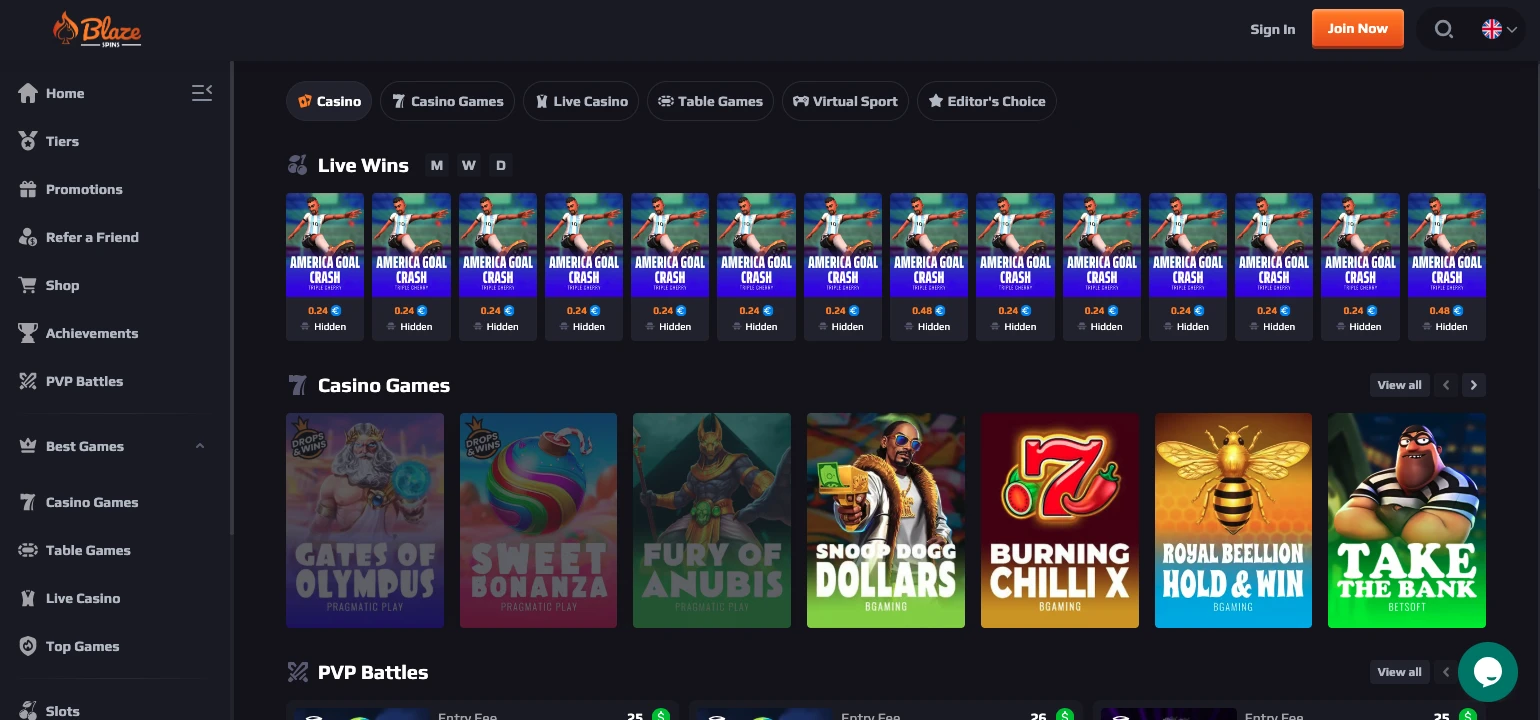
The Blaze Spins Casino app is a browser-based platform operated by One Touch Exch Co. Ltd, licensed under the Anjouan Gaming License (Union of Comoros) and available to Canadian players. The site carries 13,000+ games, accepts Interac and a wide range of cryptocurrencies, and runs on Android, iPhone, iPad, and desktop without requiring any download. This page covers how mobile access works, what the lobby looks like on a small screen, and which payment and game conditions apply across devices.
How Mobile Play Works Here
The Blaze Spins Casino app operates entirely through a mobile browser — there is no listing on the App Store or Google Play, and no APK file is distributed. That delivery model has specific implications for different types of players. Anyone who prefers a native app experience will find that this platform does not offer one; anyone who is comfortable loading a browser URL will find that the full library is immediately available.
The approach works through a responsive site design that scales content automatically to the screen in use. Key features of this model include:
- Responsive site — pages reformat automatically for portrait and landscape orientations on both iOS and Android
- No store listing — nothing to download; the session starts by loading the site address directly
- One login everywhere — the same account credentials work on phone, tablet, and desktop with no separate mobile profile
- Instant access — no installation step, no update management, no storage use on the device
For a broader overview of what the platform covers beyond mobile, the all Blaze site overview details the full range of categories. Blaze Spins applies 256-bit SSL encryption across all sessions, including mobile, so the security layer does not degrade when shifting from desktop to a phone browser.
Getting Started on a Phone
Mobile access on the Blaze Spins app comes down to three actions: open the site in a browser, sign in with existing credentials, then tap the wallet icon to fund the account or begin playing.
| Step | Action |
|---|---|
| 1 | Open the site in a mobile browser (iOS Safari or Android Chrome both work) |
| 2 | Sign in using registered email and password |
| 3 | Tap the wallet button beside the account balance to deposit or withdraw |
Registration, if the account does not yet exist, requires a username, country (Canada), currency (CAD), date of birth, phone number, and password. A six-digit verification code is sent to the registered email address and must be entered before the account is active. The Blaze Spins Casino app download question comes up frequently: there is no downloadable file, so this step is replaced entirely by the browser load, which takes a few seconds on a standard mobile data connection.
The platform’s promotion structure is accessible from the mobile lobby immediately after login. Details on how those promotions are structured — including daily reload options and the Coin Store — appear in the exclusive Blaze promo system section of the site. Minimum deposit thresholds to trigger a welcome bonus sit at $41.83, a figure that differs from the standard $30 table minimum and applies specifically to bonus qualification.
Games That Suit Small Screens
Slots and crash games translate best to a phone screen, and the Blaze Spins mobile app carries an extensive selection of both. Portrait-mode slots are designed for vertical scrolling and single-tap spin controls, making them natural fits for one-handed play. Live table games and game shows are technically functional on mobile but demand a stable connection and a comfortable screen size to track cards and dealer feeds without strain.
Formats available through the mobile browser include:
- Slots and crash titles — Gates of Olympus, Sweet Bonanza, Fury of Anubis, and 13,000+ total games span multiple categories; crash games are also confirmed functional on mobile
- Live blackjack — Lobby Blackjack and Speed Baccarat 1 confirmed in the live lobby; Evolution and Pragmatic Play supply these tables
- Baccarat tables — Golden Wealth Baccarat, Baccarat 5, and Bac Bo available in the live section
- Game shows — Boom City and Ice Fishing are listed in the live category and load in the mobile browser
The Blaze Spins mobile app carries an average RTP of 97.45% across its eligible game pool — the same figure as on desktop, with no mobile-specific reduction applied. Account setup details and verification requirements are outlined in the secure Blaze profile steps documentation. Players who prefer PVP Battles, which require OnlyPlay titles with a minimum entry of $20, can access that feature on mobile as well, though the interface is more comfortable on a larger screen.
Cashing Out From Mobile
Payout timing at Blaze Spins does not change based on the device used to submit a withdrawal request. The same processing windows apply whether the request is submitted from a phone browser or a desktop session.
| Method | Processing Time | Minimum Withdrawal |
|---|---|---|
| Interac | 24–48 hours | $50 |
| Debit/credit card | 3–10 business days | $50 |
| Bitcoin (BTC) | 24–48 hours | $50 |
| Skrill | 24–48 hours | $65.13 |
| Neteller | 24–48 hours | $81.41 |
Interac is the fastest conventional method available to Canadian players, typically settling within two business days. Debit and credit card withdrawals are the slowest option at 3–10 business days, a gap that is notable for players who depend on quicker access. Crypto withdrawals also settle in 24–48 hours, though a minimum balance of $69.40 (in the relevant cryptocurrency equivalent) must be present before a crypto cashout can be initiated.
KYC verification is not always required before a withdrawal, but the operator may request identity documents at its own discretion. Players who have not yet verified their account should anticipate a potential documentation step that could extend the timeline beyond the published processing window.
Navigating With One Hand
Moving around the Blaze Spins lobby on a small screen is structured around a persistent bottom menu that keeps the most-used functions in thumb reach. That menu eliminates the need to scroll back to the top of the page to switch categories.
The key navigation elements accessible from one-handed use include:
- Bottom menu — fixed at the foot of the screen; provides shortcuts to the main lobby sections without returning to a home page
- Search field — available from the lobby for locating a specific game title directly; useful when the library exceeds 13,000 entries and browsing by scroll becomes impractical
- Category filters — Slots, Table Games, Live Games, Crash Games, Poker, and Baccarat are separately filterable, reducing the displayed set to a manageable size
- Promotions shortcut — the bottom menu includes direct access to active promotions, meaning the Coin Store, PVP Battles, and reload bonuses can be reached without navigating through multiple menus
The Blaze Spins Casino app download also supports landscape orientation, which is more practical for live dealer tables and game shows where the dealer feed occupies the upper portion of the screen. Slots run in both orientations without layout problems. The lack of a dedicated native app means that push notifications and home-screen shortcuts are not natively supported, which is a practical limitation compared to platforms that offer installed applications.
Why Browser Play Stays Current
Browser delivery means every player is on the latest version of the platform automatically, without managing app updates through a store. When the operator adds new game titles — drawn from providers including Pragmatic Play, Evolution, BGaming, BetSoft, Mascot Gaming, OnlyPlay, and more than 65 additional studios — those titles appear in the mobile lobby the moment they go live on the site, with no client-side update required. That is a meaningful practical advantage for a library that already exceeds 13,000 games and continues to grow.
Blaze Spins carries an Anjouan Gaming License issued by the Union of Comoros, which governs the platform’s operation including mobile access. The 256-bit SSL encryption layer is applied at the server level, meaning the same security protection covers all browser sessions regardless of device or network. Players accessing via mobile data rather than Wi-Fi should note that this does not change the encryption standard, though network-level privacy on public connections remains the player’s own responsibility under the site’s jurisdictional compliance terms.
The trade-off in the browser model is the absence of features that native apps typically provide — offline caching, biometric login shortcuts, push alerts for promotions. None of those are available here. Players who place high value on those conveniences will find the browser approach limiting, while players who simply want access to a large game catalogue on a phone without a download step will find the model functional and consistent.
Mobile Versus Desktop — Which Player Profile Fits
The app suits players who want access to a large library across multiple devices without committing to a download or maintaining an installation. Slot players in particular — given that the catalogue spans thousands of titles from providers like Pragmatic Play, BGaming, and Evoplay — find the mobile browser format practical, since vertical slot layouts are designed for phone screens. The Interac withdrawal option at a $50 minimum, settling in 24–48 hours, gives Canadian players a fast and familiar payment path that works identically on mobile.
Players who want a native app experience with push notifications, biometric access, or offline features will not find those here. The 3–10 business day card withdrawal window and the discretionary KYC process add potential friction that exists regardless of device. Desktop remains more comfortable for extended live dealer sessions where screen real estate and connection stability matter most. The platform serves the on-the-go slot and crash game player reasonably well; it is less tailored to a player who demands the full feature set of a purpose-built mobile application.
Frequently Asked Questions
Is there an APK file for Android?
No APK file is available for Blaze Spins Casino app download on Android. The platform does not distribute an installable file through any channel, and it does not appear on the Google Play Store. Access on Android devices is through a standard mobile browser such as Chrome, which loads the full site at the standard web address.
How do I start playing on a phone?
A player opens the site in a mobile browser, logs into an existing account, and taps the wallet icon to deposit funds. The registration process — if an account has not yet been created — requires a username, date of birth, phone number, and a CAD currency selection. A six-digit email verification code completes account activation, after which deposit methods including Interac (minimum $30) are available immediately through the Blaze Spins Casino app interface.
Are payout times different on mobile?
Payout times at Blaze Spins are set by the payment method, not the device. Interac withdrawals take 24–48 hours and carry a $50 minimum whether the request is submitted from a phone or a desktop. Debit card withdrawals take 3–10 business days from any device. The operator may request KYC documents before releasing a withdrawal, which can extend processing beyond the published window.
Where is the bottom menu?
The bottom menu is fixed at the foot of the screen in the mobile browser layout. It provides access to the game lobby sections, active promotions, search, and account functions without requiring a scroll to the top of the page. The Coin Store and PVP Battles shortcuts are also reachable from this menu on both Android and iOS.
Which games work best on small screens?
Slots are the format most suited to small screens, as they are built in vertical layouts with large tap targets. Crash games also perform well in portrait mode. The Blaze Spins app runs live dealer tables and game shows in both orientations, though those formats are more comfortable on a tablet or desktop where the dealer feed and betting controls are easier to read simultaneously. Category filters in the lobby allow a player to narrow the 13,000+ game library to any single format quickly.